I’ve had it less than a week but thought I’d take a moment to share my thoughts after the first use. No pictures though as they are really easy to find and given that this is a handheld setup, I didn’t take any with both hands being occupied for my first use.
On the way home from work today I stopped at a previously unknown park – US-9385 – and do a quick activation. I’ve driven by this park hundreds of times and never knew it was there until I saw it on the POTA website maps.
This scenario is exactly why I bought this radio. Short, quick stops or lightweight, all-in-one kits on extended trips type situations. I stopped at the park, found a spot to park the truck, walked a ways to a bench, and then was on the air in less than 2-3 minutes.
No throw line. No vertical antenna assembly. No coax along the ground.
Granted, no gain and no elevation for the antenna, but that is exactly what this setup (the Edgewood package) is – a quick and easy to deploy kit with classic Elecraft quality.
20 meters wasn’t the best at the time (should have considered 15m given the time of day), but I still had 10 contacts in about 26 minutes. Not bad in my book. I did have one hunter tell me “QSB QSB”, which I can confirm was the case with one of the contacts I received. He was in and out.
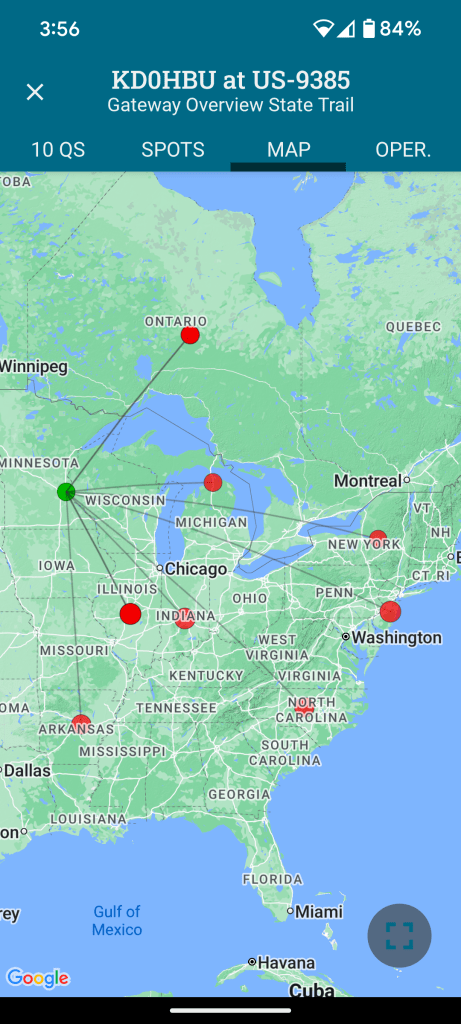
Map of contacts below. Note that having two in Ontario and two in Indiana means that the dots below overlap. 10 contacts but eight dots on the map.
Overall Impressions
There is a lot in this little package. It fits nicely in the hand (I hold it in my left to leave my right free for sending CW and logging contacts). Not too wide for my hands, and not so narrow that I fumble with it.
Your mileage may vary.
The screen isn’t huge, but even as someone with reading glasses I had no trouble with clarity of the characters.
Keeping things small means that there are few buttons (4 in total) and, with the small screen there is a short learning curve on how to navigate. The printed manual is well laid out as usual and reading it end to end gives you all you need to get going quickly.
The Paddle
The included paddle (at least included in the Edgewood Package) is the v2 at this point (I believe). My opinions here are mixed. While it isn’t uncommon for me to have to correct something I send, and perhaps it was just today being the first time I’ve had this on the air, I found myself constantly having to send corrections. In the shack it felt fine, but actually at the park bench operating it was different somehow.
Standing up halfway through the activation actually felt more natural than sitting with it in my hands. Not sure why, but it changed the dynamic just slightly.
I felt sloppy and unable to fine tune my sends like I can with other external paddles. This seems to align with other people’s impressions even with the v2. I plan on getting the N6ARA tiny paddle adapter from Tufteln. Every person I’ve seen review it raves about that combo with this radio.
It is still well designed as a portable paddle that can be turned around in its connection to keep it out of the way for transport.
If you want a great paddle comparison, check out N7KOM’s video on the subject.
The Screen Cover/Logbook
The included screen cover is well designed and fits snugly. It has slots for paper logs (Elecraft makes them available here) and a small pen that is included in the package.
The pen is basic, metal, and small. It works as intended but may not be well liked by folks with bigger paws. The pen tip produces a line that isn’t too wide for the size of the log paper rows, so it is well selected for the intended purposes.
The log pages are just the most important information. QTH, Date, and Band at the top, with a table below it with rows to record Time, Call, and Info (I use that for QTH or reported P2P identifiers). I find that you have to stack several of them to keep them from moving side to side when writing.
The Battery
I haven’t put it through its paces yet, but it seems to be more than enough for what this is built for.
Charging is not a quick affair. Out of the box I let it charge for several hours. They have a quick charger available that has to be used with the battery taken out of the radio. The built-in charger does its job albeit slowly.
Other Notes
If you use headphones or ear buds (and I recommend you do), find some with a right-angle plug. I found that my straight connector plug ear buds interfered with the screen cover.
The Case and an Alternative
The included case with the Edgewood Package is standard Elecraft fare. It is a scaled down version of the cases for the KX2 and KX2. Minimal, soft, and with a couple of pockets on the outside (and one slot pocket inside).
Seeing Tufteln’s modified Pelican M40 case, I decided to grab one myself and go to work with my heat gun. They are readily available on Amazon or local outdoor retailers. I will say, however, that if you’re not confident and willing to potentially ruin an otherwise great case, going the Tufteln route might be the best option.
About ten minutes total time of carefully, slowly heating each side where the antenna is too long to go into the case, and then slowly putting pressure with a rounded object gave me just enough room on each side to easily get the radio with attached antenna (side storage attachments, not attached to the top connector).
If you go this route be really careful not to change the fit of the two halves of the case together. Keeping the heat focused below the lip of the bottom half and keeping the pressure on the rounded object about halfway between the bottom and the lip is what worked well for me.
Putting the coiled counterpoise wire on top of the radio and closing the lid provided enough friction/pressure when closed to keep things from sliding around inside.
This isn’t as lightweight as using the soft sided case from Elecraft, but offers far more protection from weather and bumps.
Conclusions
So, am I happy with this little radio given all the many months of being on the fence whether to purchase or not?
After one park activation and roughly 11 QSOs total?
An emphatic yes*
(*I don’t regret it at all – yet – but it isn’t a “buy once, cry once” radio)
It is smaller than my KX2. It lacks the capability and frequency range of the KX2 as well, let alone the other mode availability.
It does, however, provide ergonomics, portability, and my most used bands in a smaller package.
If I could only choose one of the two, which would I land on?
The KX2 is the better radio overall in my opinion. But I can honestly say that even with the AX1 antenna, I’ve never been able to comfortably stand and send CW like I could today with the KH1.
Going someplace without trees and a place to sit, standing there with KH1 in hand is an option I didn’t feel like I could do easily with the KX2. Since I don’t do much voice operations, the KX2 feels like more radio than I need. Having said that, having the option of SSB is something I may be glad to have depending on the situation.
Of course, having gotten my KX2 used for a really, really great price means that it is an easier pill to swallow than if I bought both at MSRP with all the options.
The KH1 fits my use cases well. As with any large purchase, and ham radio is nothing if not large purchases for most people, take your time and do your research.
An Aside
With today being October 1st, did anyone get in on the first 100 new MTR3b units that became available today?
Capacitive touch keyer built-in. Volume control (something lacking in my MTR4b). Adjustable side tone. Color LCD display.
All in a ~134g package.
They say they plan on ramping up production to large scale due to their anticipated demand, and having sold out the 100 units today in “…a few minutes” seems to validate their assumptions.
I first saw this kit online this last summer and was immediately intrigued. Fast forward to obtaining the December 2021 edition of QST where they did a review of the radio, and I knew I needed to get one.
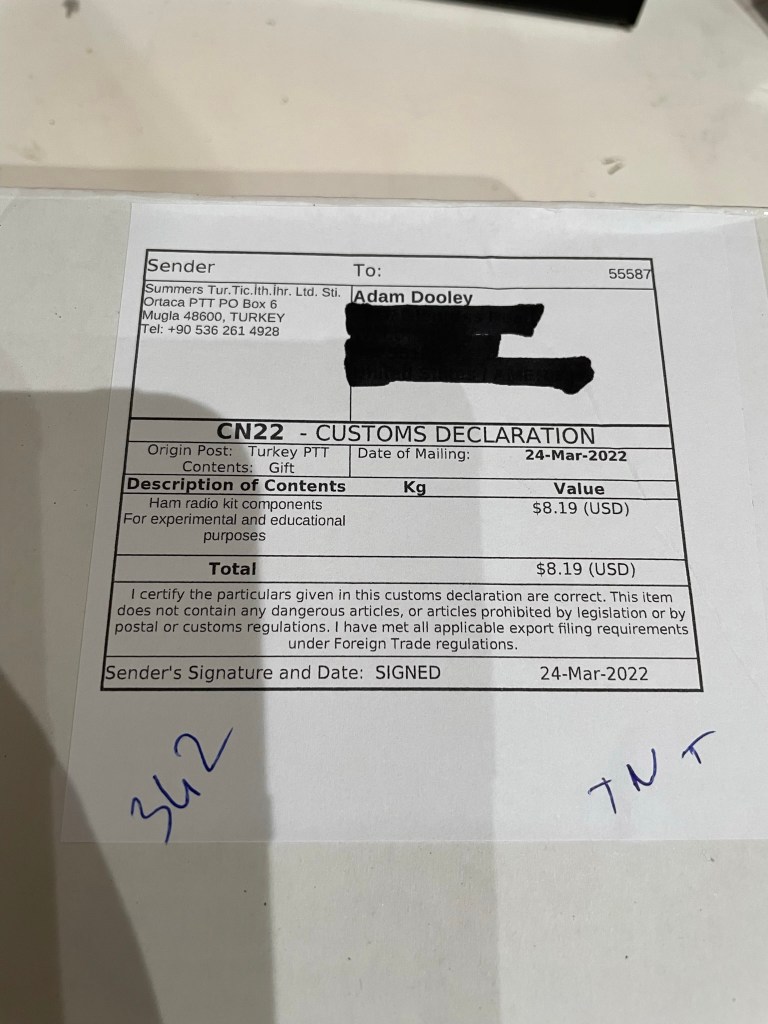
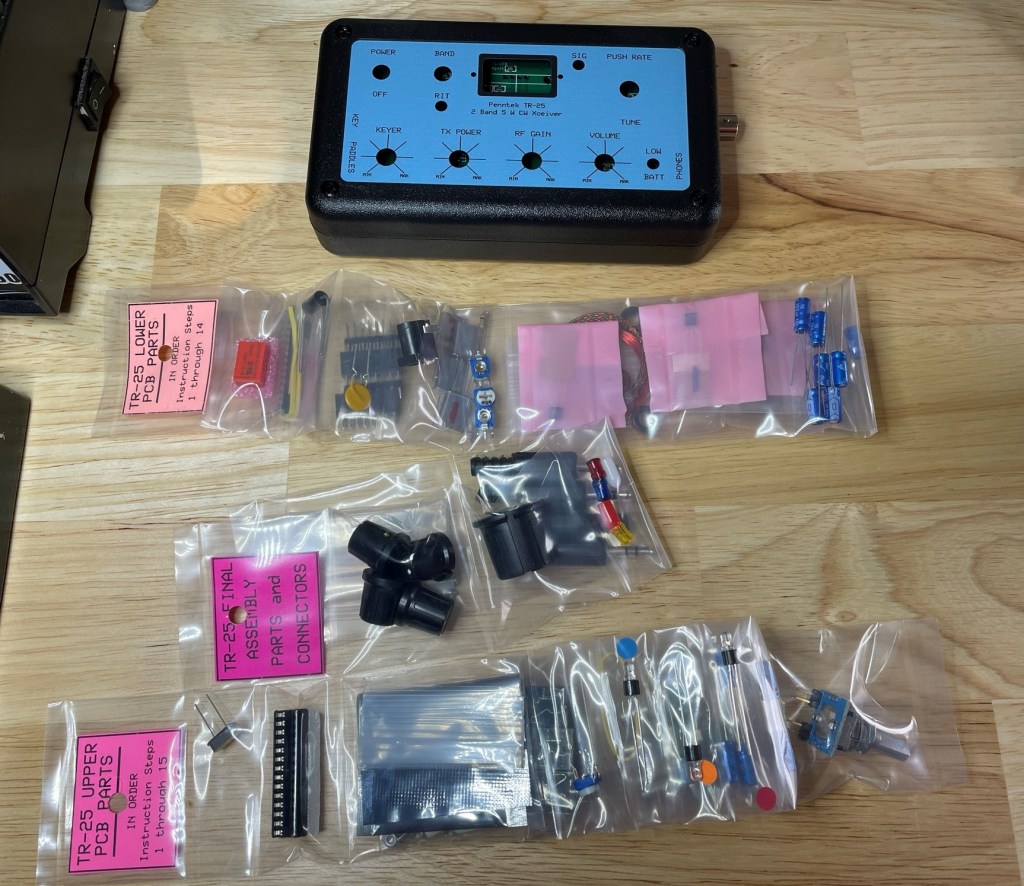
The kit arrived in a well packed box about 1 week after placing my order. Unpacking it I have the following contents:
The PCBs are packed inside the radio case, and all the individual parts are packed together based on which part of the radio is being assembled.
For example, all the lower PCB parts are packed together and separate from the upper PCB parts. Even more convenient is that within each set of parts, each one is organized in the order of assembly. A welcome usability improvement over other kits I’ve done where parts arrive loose in a single plastic bag.
Also included are print outs of the assembly manuals, which are likewise separate pages for each section
Installation of all components is very straight forward. If you can solder, you can install all the parts.
There are 6 toroids that need winding. None are overly difficult (I still have flashbacks of T1 on the QCX mini ;)). The directions are very easy to follow and there are picture to validate your windings against.
I’m not going to go through a step-by-step of the assembly – the manuals do that for you. K0SSK also has a great post showing assembly and testing of the kit.
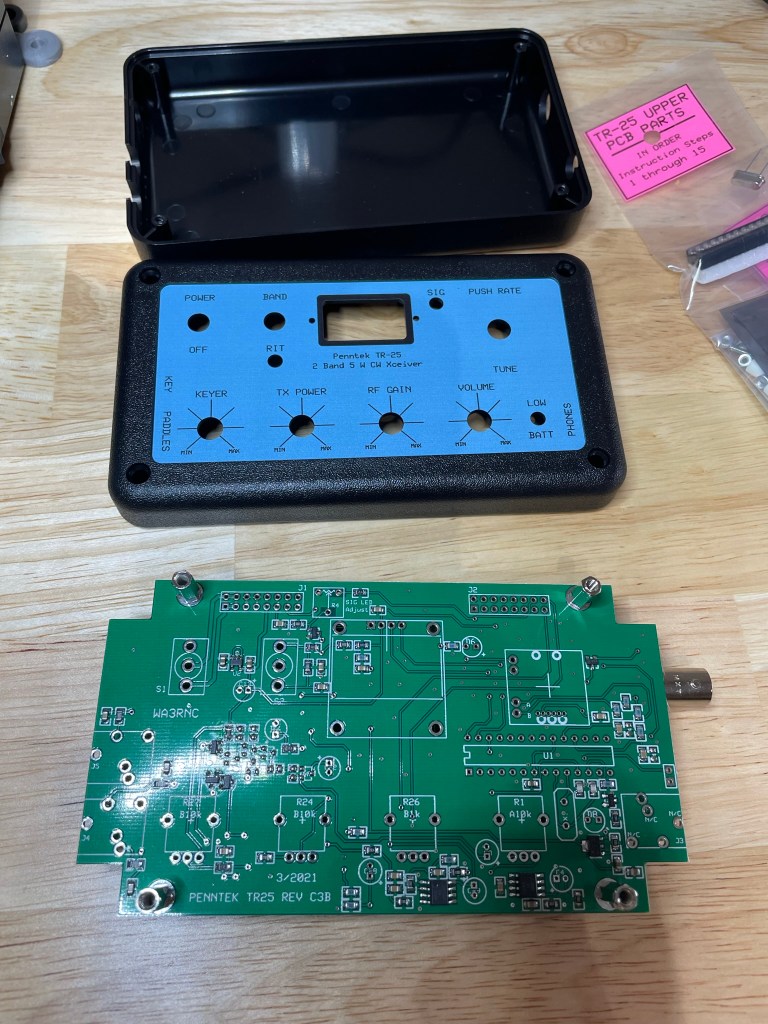
Assembled minus the bottom half of the case – need access to the pots to perform final checks and adjustments. Nice clear OLED screen. Always makes me smile to see things work as expected, even more so that I didn’t let the magic smoke out. 🙂
Quick Comparison
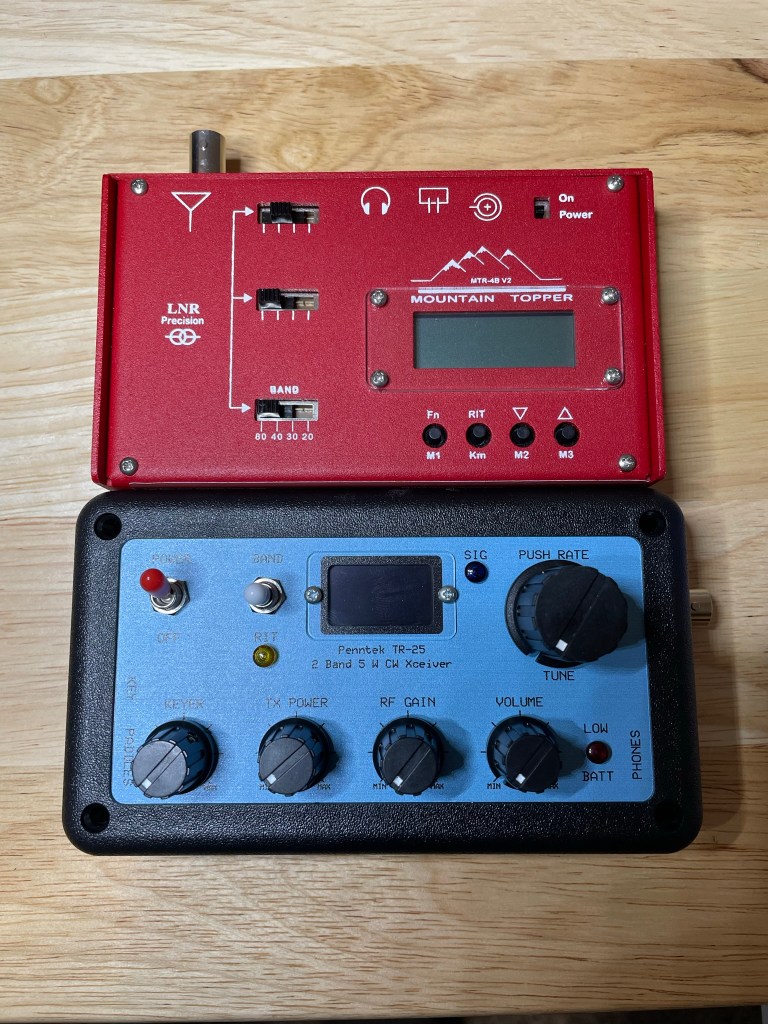
Looking at my other radios, the size lends itself to being compared with my Mountain Topper from LnR Precision.
Both come in at roughly the same dimensions. The Mountain Topper is 4 bands (80/40/30/20) compared to the TR-25’s 2 bands (20/40). While both radios offer QRP portability for commonly used bands, you can see that the tradeoff is either usability (a control for everything) vs breadth of capabilities (more bands, memory slots, etc.).
It is a little of an apple and orange comparison when putting a commercially built radio up against a kit given that the MTR comes assembled, but it is the only multi-band radio that is close to the TR-25 in my collection.
Minor Nits
There are a few things missing from this radio that others have, such as:
No memory slots for recorded SOTA/POTA/CQ messages
No visual indication of WPM for the Iambic-B (there is no Iambic-A support) keyer, the dial simply has Min/Max markers
The design is intuitive and having a dial/knob/toggle for all settings is actually nice thing given how many radios use menu and sub-menus to death, but they do stick up from the radio and might be subject to being broken in the field – time will tell
These are minor nits in my opinion as not everybody needs every bell and whistle to enjoy SOTA/POTA/QRP operations.
Conclusion
This post is focused on the quality of the kit and what I received for my money. I have not yet gotten in on the air and will follow up with my impressions there. For now, keeping things focused on the kit building side.
The TR-25 is easy to assemble, with 4-9 watts of output depending on band and power input, no hideous menu structures to memorize (everything has a switch or knob on the face). A great little radio that can be put together and be on the air quickly and easily.
NOTE: Penntek is coming out with the TR-45L 4 band transceiver that is currently in beta testing. It looks a bit “old school” and I’m definitely intrigued.
I’m a few weeks into the CWOps Basic Course and, with some experience and time under my belt, felt it was time to post an update on how things are going.
First off, the course is not a traditional type of class. Students are expected (and rightly so I believe) to drive their own progress via daily practice routines that are laid out simply and in a highly consumable manner. (read: if I can follow it, you can too)
The focus starts on Instant Character Recognition (ICR), where in a half second or less your brain associates the character with the CW being received. This would be similar to someone holding up a card with a random letter or number on it and your brain instantly knowing which one it is visually. If you’re reading this, you’re already doing that with the alphabet and what you see on this screen.
There are tools and exercises along the way to train your brain to pick out the sounds quicker and quicker each week. More complex activities are then introduced as words and phrases are built out and expanded.
There are two sessions each week with an advisor, who provides guidance and inputs along the way. They assess each student’s progress at regular checkpoints, and will point out errors.
So how is it going?
Well, I am surprised (pleasantly so) how fast I am actually progressing. I started off my CW journey earlier this year doing a lot of repetitive learning of characters on my own, using apps like Morse Mania and listening to audio files developed by Morse Code Ninja (seriously give that guy a donation – his work is phenomenal). That gave me a solid foundation for the Basic Course that I’m in now. I’m seeing definite improvements in recognition of my problem characters that plagued me for weeks prior. I can follow QSOs more easily now, and my fear of getting on the air has lessened quite a bit. This at a little less than halfway through the course.
The group is fantastic. We all are progressing and struggling in different areas, but we take the time to work together via Discord video chats to push each other along.
I highly recommend this to anyone looking to learn or significantly improve their CW abilities. The coursework is well planned, the advisor has been amazing, and it is exactly what I needed.
The IC-705 (Top – shown with Peovi Carry Cage), x5105 (Lower Left), and KX3 (Lower Right – shown with Side KX panels)
A new radio just came into my possession and I’m in the process of deciding which one to let go as none of these are inexpensive and this is a hobby, not life. (blasphemy I know)
The Icom IC-705 is like the baby brother/sister to my Icom IC-7300. I might do a more thorough review at some point as I get more familiar with it in actual use, but part of that appeal is the continuity between what I’m using as my base rig and what I take into the field.
I’m hoping that this helps anyone looking at some of these radios as upcoming purchases. There are lots of YouTube videos for each of them, so I’m not going to deep dive into all the specifics of each one; rather I’m going to give you my honest impressions across 4 defined parameters.
Also, I am quite aware that if we really want to go light as possible, taking something like the LnR Precision MTR4B v2 or a Small Wonder Labs Rockmite will more than get the job done, but this comparison is about QRP radios that are a small package, not the smallest package.
This is a very long post, so I’m including a table of contents. Skipping ahead to the Final Thoughts on Each Radio might be where to go if you’re strapped for time.
* KX3 is modular and supports expansion of capabilities beyond stock, increasing options and weight to carry **No maximum given by Elecraft, but I’ve seen as high as 300mA on other sites ***Available as add-on
As you can see, there is a lot of similarities between all three, but a huge disparity in price. From a size/weight perspective, the differences are not substantial overall, though the KX3 is noticeably lighter as it doesn’t have a built-in battery pack (it does have AA battery holders internally that do add weight when filled) and the IC-705 is thicker front to back.
IC-705, KX3, x5105 – The first two with the protective accessories discussed in the article below
Review Criteria
My needs in a radio are not static – a year ago I wasn’t even considering CW as a mode. Today, that is what I am learning/practicing/using in any spare time I have. I am super excited to have made my first CW contact on Memorial Day 2021. As such, there are only a few things that I absolutely need in a new rig; understanding that habits change and needs evolve.
These are the things that I look for in a radio in no particular order.
Power
Power!
Input and consumption, not necessarily output. These are all QRP/QRPp capable radios, and for the most part I use them as such.
For portable ops, power consumption is a real concern and one that is a focus of much of my radio research. Each radio brings something to the table on the power input and the consumption of power fronts that are pros and cons for me.
User Experience
While I am a Product Manager today, that combined with my former roles in Software Development and Quality Assurance means that I have a natural focus on the end user and what they experience with the product. This is a multi-faceted arena that encompasses not only the exterior design of the product and the user interface to get the tasks done, but also in the company that supports it along the way and what they provide.
Features
Too many features can make a product unwieldy and difficult to use. Too few leave the operator wishing for something …. more. For the intended usage of the product, which in this case is enabling portable operations, it is a combination of modes, bands, built-in options, accessories, and more.
Does the radio do the things that I would expect as an operator? If I took only this radio into the field, what might I also need to bring? What could I leave behind?
Build and Quality
Looks rugged. – Photo by Jocelyn Caron – used under Unsplash License
Does this thing feel like one of my kids’ toys? Am I going to have to wrap it in bubble wrap when I leave the house, or will it endure normal usage with common sense handling? Do the pieces mate up correctly and solidly, or did it come out of a cereal box? Are the control surfaces sturdy or flimsy?
Jumping-off Point
There are hosts of websites and videos that cover the details of each of these. QST magazine (ARRL) reviewed the KX3 in their December 2012 issue, the x5105 in their April 2019 issue, and the IC-705 in their February 2021 issue. As is the case with their reviews, there is a lot of technical information including receiver dynamic testing, CW keying waveforms, among other things.
There are unboxing videos, detailed photos of every menu option and how to use each radio out there online.
This is NOT one of those reviews.
These are the types of things that if you and I were sitting down comparing notes, I would talk with you about face to face.
WARNING: I can get a bit long winded. Good luck!
The Radios
Icom IC-705
Shown with the Peovi Camera Mounts Carry Cage (sold separately)
Power
The IC-705 ships with the BP-272 Battery Pack; a 7.4v / 1880 mAh battery which is also used by the ID-31 and ID-51 handheld radios. It is removable and installs just like it would on a handheld transceiver. There is no taking apart a back cover or anything like that. This is a very positive move for a radio maker – create cross-product accessories to enable reuse and continuity for operators.
When using the BP-272 at 7.4v, the output power of the radio drops to 5 watts from the 10 watts that is possible when using an external 13.8v battery or power source. For QRP/QRPp operations, that is not an issue and probably even desirable, and Icom claims a runtime of approximately 3 hours off of the 7.4v battery alone.
K4SWL (who runs two amazing blogs at www.qrper.com and www.swling.com – bookmark these!) did some testing of the BP-272 battery. He found that for receive only, the IC-705 provided a very respectable 7.5 hours on a charge. For POTA/SOTA ops, he still had 40% after 2 hours after normal TX/RX use in the field. Icom’s claim above may be somewhat conservative based on that alone.
Having just received this radio, I haven’t had a chance to put it through its paces yet to see if any firmware updates, etc. since K4SWL did his review have changed anything, but I’m expecting something similar.
User Experience
In many respects Icom has taken their popular IC-7300 (which also I own and use as my base rig) and created an offspring that reflects its parentage in a smaller package. It looks very similar, and if you’ve used its parent then you’ll feel right at home. The screen is the same size as the IC-7300, with lots of information available in an interface that can be adjusted to meet your current operating needs. There are obvious adjustments for things like battery reporting, GPS options, and 2m/70cm operations, but it largely feels like the IC-7300.
A combination of touchscreen and physical buttons mean that the main body of the unit has a lot going on. 14 physical buttons, 3 knobs (which are also buttons), and 1 dial (looks and feels like a mini version of the one on the IC-7300) surround the touchscreen on three sides.
With the radio off, it looks more spartan than it is, as the touchscreen adds additional menus and options that can be accessed. With the screen on, it is as busy as the KX3 is, though it feels less crowded. I don’t mean that in a bad way, but it feels new whereas the KX3 feels more classic. Think Tesla vs Cadillac. Neither is a car that that I would say “no” to, and would fit all my most pressing needs and more, but one just feels more modern than the other. (I know Cadillac has a very modern lineup, but they’ve been around longer than I have and I still think of them as a classy and classic style of car).
There is something positive to be said about both.
I have never had to contact Icom for any reason, so I cannot speak with any experience to their support. I am quite pleased to see that the radio has received regular firmware updates which speaks to continued investment in keeping their customers happy. The most recent update was within a week of my receiving the radio. Thanks Icom!
Features
This is where the Icom radio starts to really differentiate from the Xiegu and the Elecraft. All three have similar overall features (the KX3 with add-ons of course), but the IC-705 comes out of the box with features that neither have:
HF/6m/2m/70cm support out of the box
D-Star Support
Realtime spectrum display
Color touchscreen
Bluetooth – sync a wireless headset or ear buds
Built-in GPS
Wifi (WLAN) – operate remotely
USB based rig control (micro-USB cable, non-proprietary)
micro-SD card slot
First of all, not having to own a proprietary cable is long overdue and a game changer. The IC-7300 also uses a standard USB cable which simplifies things when using 3rd party software for digital modes. While I would prefer USB-C as most things are standardizing on that interface now, I have enough of these micro-USB cables lying around the house that I never have to worry about losing one and then spending on expensive adapter cables.
Lose one in the field or on vacation? Hit the local gas station and grab a new one (though it would probably need a ferrite on it).
Oh, and you can charge the battery with it too.
Yup.
Autotuner?
Nope. Of all the many, many things packed into this small package, this is the one thing that I wish this radio had. Having said that, it would probably have meant giving up other things to keep the same size and price point, and resonant antennas are not hard to build.
Still, it is disappointing. I want my cake and I want to eat it too.
They do make an IC-705 specific autotuner called the AH-705. At almost the same size (7.4″x4.1″.1.6″) as the KX3 (7.4″x3.4″x1.7″), almost a full pound in weight, and $359 USD at the time of this writing, it is inspiring me to stick with resonant antennas for now.
In fact, the Chameleon Antenna MPAS Lite produces acceptable SWRs without a tuner for most of the bands that I care about in both the vertical and the EF inverted “V” configs. I am loving that antenna and use it with everything now.
Build and Quality
Unlike the other two radios in the article, and unlike its parent the IC-7300, the IC-705 is all plastic. This is not a bad thing necessarily, but it does stick out as a significant different and interesting design choice for Icom. With all that they put inside this thing, and it being 1.5″ thicker than the other two, it may be that choosing a plastic case brought the weight down to be comparable with competitors.
Whatever their reason, it still feels reliable and sturdy and not at all like one of my kids’ toys. Plastic adorns many things that we want to be durable and last but still sustain some abuse, so it likely isn’t an issue in the long term. Removing the battery shows a very hefty piece of aluminum inside the case, so it isn’t plastic through and through.
Like the KX3, however, I did opt to put an aftermarket product around it to give just a little more resilience and protect the face of the radio as well. In this case, I chose the Peovi Camera Mounts IC-705 Carry Cage. It surrounds the top edge in a thick band of aluminum that is lined with tapped holes where a creative ham could conceivably add home-brewed accessories and have them securely mount to the radio without needing to modify the radio itself. I use a similar cage for my DSLR camera and they are great additions.
On that note, there is an angled section part on the bottom rear of the case that is supposed to allow users to tilt it back for a better viewing angle. I found that when fiddling with the radio, it didn’t stay that way all the time and preferred to move a bit. Many have solved this problem with 3D printed feet that screw into the bottom mounting holes. The Carry Cage I purchased provides a small shelf that really keeps this thing in position. A flip-out foot like the x5105 has would have been a welcome addition to keep things more stable for the stock radio, but I’m nit-picking a bit here.
Ports on the side come with rubber dust-covers to keep stray junk out – a nice addition for a radio that is meant to be portable. They are easy to access, though getting your micro-SD card out can require some patience, fingernails and/or some tweezers. A momentary push does cause it to pop outwards slightly, but it is still recessed a bit and hard for this guy to get out with short fingernails.
Xiegu x5105
Glowing green buttons galore!
Before I get into the review criteria, I do want to hit one thing. I learned Mandarin Chinese as a second language and have spoken it now for the better part of 30 years. Once I know how to pronounce something as a native speaker would, or at least as close as I can get to doing so, I tend to use that over the more commonly accepted way here in the West.
For example, Wang is pronounced “Wahng”, not “Wayng”.
For this company, most will say “zygoo”. In Chinese the “xie” (协) sound is pronounced more like “syeh”, spoken as a single syllable. So Xiegu becomes “syeh-goo”, not “zygoo”. I’m probably still not saying it perfectly as a non-native speaker, but there you go.
Linguistics lesson over.
<slowly steps down from soapbox and exits stage-right>
Also, it might seem unfair to compare this rig with two others that cost more than twice as much, but Xiegu has positioned this radio to compete squarely in this field with a feature set that others would charge a lot more for, so I feel like it is a valid comparison.
Are you getting a $1200+ radio?
Nope.
But I think you’ll see that you are getting a substantial piece of kit for the asking price.
Power
The built in battery, though non-removable, is one of the reasons that I keep taking this radio outdoors. Just charge it, grab and go. No external power needed. My usage has shown that it lasts a looooong time on a charge, and if combined with a solar panel or even just an external LifePo4 battery like those from Bioenno Power, you can go until you’re ready to come home.
User Experience
The screen is rectangular, and the text is crisp and easy to read, with dark gray text on a white background with a very faint blue tint. Even some of the smaller text, which I can have issues with as I use reading glasses, come through quite clear.
The menu system is much improved from what I’ve seen with the pre-3.00 firmware update. I have found it to be easy to navigate, though it did take me a bit to learn which buttons can be long-pressed for more options and which ones couldn’t.
There are CW memories which is a welcome thing in something this price point, but you have 10 slots and have to cycle through each one to get back to the beginning (unless someone knows better). In other words, if you are one of those that live in a less “elevation challenged” part of the world than I, you might do both POTA and SOTA activations from the same park. If you have one memory setup for SOTA, and it is #1, and another for POTA as #2, you have to cycle all the way through the remaining slots to go from #2 to #1 again.
Buttons, buttons everywhere! There are a total of 21 buttons on this radio (and one dial). They are all low-profile and small, so they don’t feel crowded like the KX3 (it has 19 buttons, 1 VFO dial, and 4 knobs), but they are still there. They are backlit however, and provide a highly visible interface for lower light conditions.
I am embarrassed to admit that the first time I sat down with the rig, I couldn’t figure out how to change the volume or the band. I’m not one to sit down and read the whole manual first – does it show? There are buttons on the top edge just out of view of the user.
One thing that did take me a couple of tries to get used to is that the volume keys adjust + and – on the left and right side of each other, but the band switching is – on the left and + on the right. Perhaps it is just me, but that oddity through me off at first.
Receive audio is fine. The DSP filtering allows for some fine tuning, but I still find it noisier than the other two are. It may be that I haven’t figured out yet how to really dial it in, but I just feel like the audio isn’t quite there in comparison. Its less than half the price, so it really is fine for all the capabilities that you get here, but you’re not going to experience the same audio quality you are from the other two.
Like Icom, I’ve never had to contact them. Unlike Icom, their last update to the radio is a couple of years old. Either they’ve really nailed everything down and its perfect, or they’ve moved on.
Features
Autotuner? Check.
Built-in battery pack? Check.
160m – 6m? Check.
2m? Nope. Still need to bring an HT if I want to do anything VHF/UHF. Is that a deal breaker? Absolutely not. This is an HF portable transceiver and as such it does exactly that.
Here is a quick breakdown of what this radio is capable of giving a user:
HF+6m bands
All modes
CW decoding (and it even decodes RTTY too)
DSP
SWR scanner (this is a huge bonus on an inexpensive radio)
Built-in Mic
There is both an internal speak and a jack for headphones. I’ve noticed that the audio in the headphones presents some noise whether the volume is high or low, and that is annoying to say the least.
Build and Quality
The large heatsink and internal battery makes this feel like a brick, even though weight-wise it isn’t much different than the other two.
The all-metal body just feels like it will take more abuse than the IC-705. It even feels more sturdy than the KX3 because of that heatsink hanging off of the bottom.
The controls are a mixed bag. The buttons are backlit which is a plus, but they feel cheap and rubbery. Squishy even.
When pressing I have had one or two have a corner that slips under the face of the radio and stick. It doesn’t cause the operation I was doing to continue, the button just gets lodged under a corner and just giving it a slight pull with a fingernail solves it. It isn’t a huge deal that happens every time, and I know to watch for it now when I’m pressing the buttons so perhaps I’ve solved it myself, but it is something that speaks to quality. The dial, however, is a great overall design if not necessarily as smooth as other radios. It is very low profile and highly unlikely to snag or get bumped by anything.
I tend to cover this in an inexpensive camera wrap from Amazon when taking it out of the house. I use these for all kinds of things and are a great way to give just a little extra protection without a lot of weight for items that I care about.
One thing that they have done extremely well is also one of the least advertised features – the extendable legs that are built in do spring and lock into place, and put it at the perfect viewing angle. The KX3 also has built in feet but they are held in place with the thumb screws that allow for the case to be opened and closed for adding new modules (see below), or even just putting in AA batteries. Those thumb screws mean that one side loosens the screw as you extend the feet, and the other tries to tighten as it extends. The opposite is also true when retracting them.
Just take a look at those legs, erm, ahem….leg. Simple yet highly effective.
The x5105’s feet are, however, a simple but elegant solution that the more expensive rigs should implement as well. I see so many radios with after-market accessories just to solve this simple problem.
Elecraft KX3
The KX3 posing in front of the climbing wall I built my kids. Note the Side KX panels (highly recommended)
Power
The website says that the radio does 10 watts, but a firmware update pushed it up to 15 watts total output. I know this section is more about consumption, but a side-note for readers.
Current draw is really minimal, and I barely notice it when recharging my external pack after an outing. I don’t have the tools to measure it accurately.
Mine came used with the internal battery holders (8xAA), but since I bought it I’ve used it exclusively off of a Bioenno Power LifePo4 battery. I have a 4.5Ah and a 12Ah – I haven’t really made a huge dent in either but I’m also not a power user like some who go out all day.
User Experience
The KX3 is BUSY. With 19 buttons, 1 VFO dial, and 4 knobs, there are things everywhere to push, twist, and spin. The menu brings a multitude of other options to the user to dial things into exactly where they need it. You can even hide bands that you don’t use often – if 160m or 6m isn’t your thing, it can be hidden via the menu option BND MAP.
It is also how you enable some of the add-ons that are listed below like the 2m module.
Even with all the “nerd knobs” all over the front of this thing, the learning curve isn’t bad at all. Every knob and button has multiple functions that are clearly labeled, and enabled by short or long presses.
Elecraft has packed a lot of capabilities into a small package that has been in the market for some years now. There are a lot of things I’m still learning about this radio, and they have even published some guides on their website to aid users.
Professionally my own product is in the middle of a modernization effort with usability at the forefront. Like the KX3, it packs a lot of function into an interface that has a lot of learning curve, so this might be more top of mind for me than for other people. I did find a cheatsheet online for the KX3 which I printed and laminated for reference at home and afar.
The actual interface is informative without being too much. The screen is backlit in an amber glow which I find quite warm and comfortable.
I’ve placed a couple of follow-up orders with Elecraft to get the bandpass filter and the CW paddle which attaches to the bottom of the radio. Shipping was prompt and it was a nice little addition to see that everything, and I mean everything has a slip of paper with the name of who packed it included.
Firmware updates continue even now, many years after its first release.
Features
The KX3 is more of a platform or an ecosystem than a single transceiver. While most every other radio manufacturer out there delivers the radio and then a set of accessories that you can purchase, the base KX3 comes either as a kit or as a factory assembled unit and then you build from there. Out of the box (so to speak), it does all the basics of an HF transceiver. The user has to purchase additional modules that can be installed yourself into the radio’s body to bring in additional capabilities, but at a cost. Unlike the other transceivers in this article, because the KX3 is designed as a modular system, I feel compelled to show some of these as parts of the whole as opposed to being accessories.
Some of those things include:
Automatic Antenna Tuner – $229
Dual Passband Roofing Filter Kit – $169
2m Band Module – $299
Upgraded Heatsink – $49
….and more
There is an external panadapter that hooks up to the radio, as well as a 100 watt amplifier that pairs nicely with this radio. Of course, all of this comes with a price.
The cost-conscious ham in all of us looks at this and sees quickly growing expenses, but what you are getting is a carefully crafted system that is extremely high quality and can be modified to be what you need and nothing more. The end result is a radio that at home can rival many of the other base rigs with a host of features, while still being able to be put into a pack and hauled up to the top of any POTA site without sacrificing functionality.
Receive audio, especially when combined with the optional filters, is extremely good. I’ll see if I can do a side-by-side comparison of all three.
I do want to get the 2m band add-on, but having just acquired the IC-705 that has 2m built-in, that will have to wait a while (if at all).
The autotuner option for the KX3 is amazing. I’ve heard people say that it could “tune a wet noodle”, and while I haven’t validated that specifically, it really can tune anything I’ve thrown at it. One of the preferred methods of operating in the field is a BNC-banana plug adapter and a couple of wires. Tune it up and you’re ready to go.
Finally, the AX-1 antenna option is another great option that, while not of the same performance as a half-wave dipole in a tree or a EFHW, gives a quick and easily deployed option for getting on the air with a low profile.
Build and Quality
The first thing I noticed when I opened the box on my KX3 was that it just felt high quality. Everything is tight and the all-metal construction feels solid in the hand. I bought mine used and even after having been in someone else’s possession for a few years, it really did feel new.
Every button is solid and every press/return is consistent. The knobs and dial are likewise tight and have just the right resistance. They do, however, stick up from the body of the radio.
Because of this I highly recommend Side KX panels. Combined with the clear cover, they provide solid protection for the interface of this transceiver.
I have often described this as the Cadillac of my radios, and that still holds true. As such, and even though it feels extremely sturdy, I still feel the need to baby it. It is a psychological thing I’m sure given its construction, but for the level of investment I made – even at a significant used radio discount – it feels better that way. 🙂
I have a Nanuk 908 case for waterproof and rugged storage of the radio, cables, and other accessories. (great case that probably warrants its own review). The other radios fit as well so its a great investment.
Final Thoughts on Each
Icom IC-705
Mini IC-7300 is what comes to mind when I think of the IC-705, and since I love my IC-7300 it is a positive impression.
There really is a strong sense of continuity that comes from firing up this little radio. It is slightly larger (deeper) than the other two, but the additional bands and features offset any size concerns for me.
Combined with the Peovi Carry Cage I mentioned above, it is a sturdy offering that I expect to endure years of outdoor use. It is, however, a plastic shell all the way around so I do plan on babying it more than I would the x5105 for example. Probably unnecessary, but that’s the way I am. The Carry Cage adds additional weight that I’d prefer not to deal with, but again I just have the slightest sliver of doubt that makes me cautious.
Plus it just looks cool. 😉
Icom has created a solid, POTA/SOTA/QRP/Mobile radio here that should meet most anyone’s demands. The interface is intuitive and clear, the controls likewise. The ability to swap out batteries without taking anything apart, and even having those batteries be something that some hams may already have in their arsenal, is a stroke of brilliance.
Pros:
Out of the box feature set is huge
Touchscreen is clear, easy to use, and readable
Batteries!
VHF/UHF bands
Micro-USB cable for data connection
Dedicated mounting holes on the bottom
Cons:
All plastic (we’ll see….probably not an issue but for the money, I want this to last)
No ATU – just use a resonant antenna
While the batteries are a strong point, they are proprietary as well. If you do not have an Icom HT that uses them as well, that may put you off.
The design doesn’t like to stay tilted by itself, 3rd part product or DIY solutions exist here but that is something that the KX3 and x5105 nailed
micro-SD slot – somewhat recessed, making removal of your storage card a little more difficult. I managed it with my fingernail – just barely – but others might find tweezers more handy
Xiegu x5105
The x5105 just feels – again perhaps more psychologically than real – like the radio I’m more willing to take into the field even though it falls a bit short in a couple of key areas like receive and build quality. The DSP and filters work to help bring in the signal, but obviously you’re not going to have the same receive experience as with the other two. Like the IC-705, it is ready to go with a charged battery and you don’t need to carry additional weight in power.
The build quality is a mixture of rugged sturdiness, offset by squishy, rubbery buttons that move edge to edge when you press them.
Pros:
Price – less than half of the others (new)
Sturdy
Built-in battery
Autotuner
Design – overall and including those foldout legs (yes, this radio has nice legs)
Cons:
For the price, well nothing really. Most of what I’m going to list just doesn’t exist at that price point when taking into account all that you get.
Audio and receive quality could be better, even with the DSP and filtering
Squishy buttons (see above)
You will need some sort of breakout cable adapter to hookup for digital modes
The CW memories are not the easiest to use (see above)
The optional panadapter is widely seen as not performant enough in the reviews I’ve read. I have not used one personally so your mileage may vary (not being reviewed here, but mentioning for your own research)
The buttons are not clearly labeled with which ones offer additional options via long-press and which don’t – the KX3 clearly labels everything so it can be seen at a glance (minor nit)
At less than half the price of the other two, however, I do not hesitate to recommend this little rig to anyone looking for a portable HF rig that can do many of the things that the big manufacturers can, but at a much more attractive cost.
Elecraft KX3
I cannot say enough good things about the KX3. It is a superb, high quality transceiver which checks all the boxes – with the right modules/add-ons. If you want to buy a single transceiver that can be used anywhere, scale to base station proportions, and do so with superb audio capabilities, I don’t think you can go wrong.
The internal battery holders mean that you can keep things powered on rechargeable or easily replaceable/available AA batteries. You do have to open the case to get to that though.
Having just said that, a part of me wishes that I had gone with the KX2 instead. I don’t use 160m… well not really ever. I don’t know why. Maybe it is that I don’t have a base antenna that covers it, so I don’t even think about it when I leave the house. The KX2 also has a built-in mic just like the x5105 has. It is slightly smaller than the KX3 as well.
At any rate, Elecraft produced a guide on choosing which radio a user should choose based on their usage, and it is something you might consider when choosing your own next purchase.
Elecraft produces their radios here in the US. Their commitment to quality is evident from unboxing to day-to-day use.
Pros:
Superb build quality
Sturdy
Modular – make this radio what you need it to be (or not)
Price – perhaps not in the realm of availability for a lot of users once you take the additional add-ons into account
Learning curve, but offset by the sheer amount of options this radio offers at home or in the field
Legs – If the x5105 has great legs, then the KX3’s are … less than attractive. Having them tied to what keeps the case together means that I have to fiddle with one side as it becomes loose when extending, and then loosen the other because it wants to tighten. When closing them up, it’s the same in reverse. This is probably me picking nits, but it is my least favorite thing about this radio.
Unlike the IC-705 which uses a regular micro-USB cable, you need a USB-to-serial cable to do hookup for digital modes
Conclusion
After sitting down and doing all the work to create this post, I am just as conflicted as when I started. In a sense that is a good thing – it shows that Elecraft, Xiegu, and Icom are hitting many of the main points that people want when making a purchase. It also demonstrates choices in the market which is, in this guy’s opinion, always a good thing.
I think we’re at a turning point in the amateur radio market. With Icom’s release of the IC-705, it shows that the big three makers are starting to realize that the way hams use their radios has changed since the Yaesu FT-817 revolutionized portable ops (or at least Icom is – we’ll see about the other two).
I previously owned the FT-817ND, and while it was a phenomenal piece of technology and highly capable, the form factor (basically flat with the controls on the edge like a desk shelf base rig) made it frustrating to use. Having to purchase separate stands to make it tilt or sit on edge to be viewable, really takes away from a UX perspective. There were also oddities with the dual antennas (one drew more power than the other), and that on AA batteries or the Ni-MH pack it automatically drops output to 2.5 watts.
Elecraft really produced winners with the KX line, positioning the radios in a way that was easy to use in the field and on a desk. Allowing for each one sold to be built out as the user needs is customization that nobody else – to my knowledge – is doing. The KX3 bridges the gap between the purely portable QRP capable radio that goes to mountain summits, and the base rig that can do it all (with the panadapter add-on and the optional amplifier). They do command a premium with all the bells and whistles, and for many users the base cost of the unit might be better put towards the IC-705 with many of those options built-in plus more, but as I said you’re buying a Cadillac, not an <insert cheaper brand here>.
Newcomers like Xiegu hitting the market with SDRs such as the G90 and the x5105 add additional pressure that both influence the big names, but also bring affordable options and offerings that allow more people a chance to get out and play without breaking the bank. In fact, the next version from Xiegu called the x6100 is starting to appear on websites.
They are moving fast and keeping the pressure on.
So what am I going to do? Which one hits the chopping block?
I don’t know yet. I really don’t.
I have a couple of other radios that are collecting dust which are going to be sold, so maybe…maybe I just keep these three for a while. 🙂
We’ll see.
NOTE: I personally own all three of these radios which were purchased with my own money over a fairly lengthy period of time. At the time of this writing, my site is brand new and I do not have advertisers. All opinions here are my own and based on what I care about. Your mileage may vary.











 kd0hbu