
I’ve had it less than a week but thought I’d take a moment to share my thoughts after the first use. No pictures though as they are really easy to find and given that this is a handheld setup, I didn’t take any with both hands being occupied for my first use.
On the way home from work today I stopped at a previously unknown park – US-9385 – and do a quick activation. I’ve driven by this park hundreds of times and never knew it was there until I saw it on the POTA website maps.
This scenario is exactly why I bought this radio. Short, quick stops or lightweight, all-in-one kits on extended trips type situations. I stopped at the park, found a spot to park the truck, walked a ways to a bench, and then was on the air in less than 2-3 minutes.
No throw line. No vertical antenna assembly. No coax along the ground.
Granted, no gain and no elevation for the antenna, but that is exactly what this setup (the Edgewood package) is – a quick and easy to deploy kit with classic Elecraft quality.
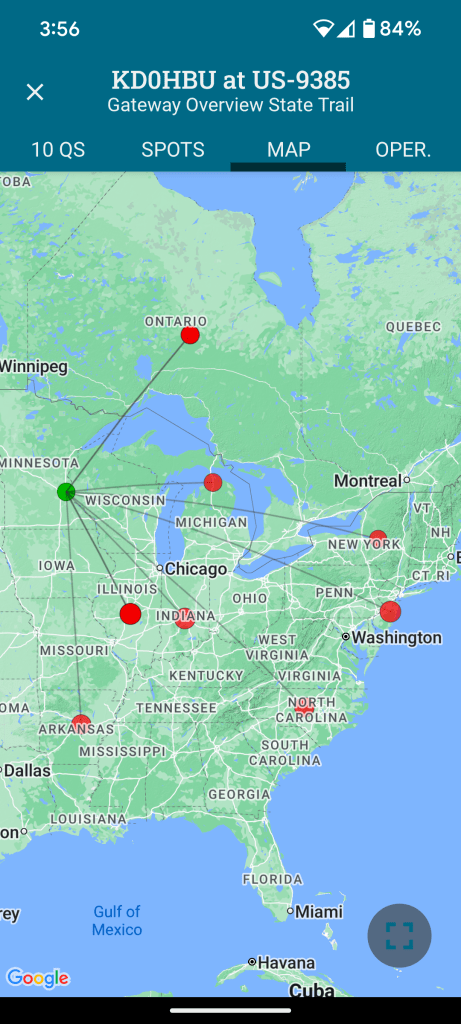
20 meters wasn’t the best at the time (should have considered 15m given the time of day), but I still had 10 contacts in about 26 minutes. Not bad in my book. I did have one hunter tell me “QSB QSB”, which I can confirm was the case with one of the contacts I received. He was in and out.
Map of contacts below. Note that having two in Ontario and two in Indiana means that the dots below overlap. 10 contacts but eight dots on the map.
Overall Impressions
There is a lot in this little package. It fits nicely in the hand (I hold it in my left to leave my right free for sending CW and logging contacts). Not too wide for my hands, and not so narrow that I fumble with it.
Your mileage may vary.
The screen isn’t huge, but even as someone with reading glasses I had no trouble with clarity of the characters.
Keeping things small means that there are few buttons (4 in total) and, with the small screen there is a short learning curve on how to navigate. The printed manual is well laid out as usual and reading it end to end gives you all you need to get going quickly.
The Paddle
The included paddle (at least included in the Edgewood Package) is the v2 at this point (I believe). My opinions here are mixed. While it isn’t uncommon for me to have to correct something I send, and perhaps it was just today being the first time I’ve had this on the air, I found myself constantly having to send corrections. In the shack it felt fine, but actually at the park bench operating it was different somehow.
Standing up halfway through the activation actually felt more natural than sitting with it in my hands. Not sure why, but it changed the dynamic just slightly.
I felt sloppy and unable to fine tune my sends like I can with other external paddles. This seems to align with other people’s impressions even with the v2. I plan on getting the N6ARA tiny paddle adapter from Tufteln. Every person I’ve seen review it raves about that combo with this radio.
It is still well designed as a portable paddle that can be turned around in its connection to keep it out of the way for transport.
If you want a great paddle comparison, check out N7KOM’s video on the subject.
The Screen Cover/Logbook
The included screen cover is well designed and fits snugly. It has slots for paper logs (Elecraft makes them available here) and a small pen that is included in the package.
The pen is basic, metal, and small. It works as intended but may not be well liked by folks with bigger paws. The pen tip produces a line that isn’t too wide for the size of the log paper rows, so it is well selected for the intended purposes.
The log pages are just the most important information. QTH, Date, and Band at the top, with a table below it with rows to record Time, Call, and Info (I use that for QTH or reported P2P identifiers). I find that you have to stack several of them to keep them from moving side to side when writing.
The Battery
I haven’t put it through its paces yet, but it seems to be more than enough for what this is built for.
Charging is not a quick affair. Out of the box I let it charge for several hours. They have a quick charger available that has to be used with the battery taken out of the radio. The built-in charger does its job albeit slowly.
Other Notes
If you use headphones or ear buds (and I recommend you do), find some with a right-angle plug. I found that my straight connector plug ear buds interfered with the screen cover.
The Case and an Alternative
The included case with the Edgewood Package is standard Elecraft fare. It is a scaled down version of the cases for the KX2 and KX2. Minimal, soft, and with a couple of pockets on the outside (and one slot pocket inside).
Seeing Tufteln’s modified Pelican M40 case, I decided to grab one myself and go to work with my heat gun. They are readily available on Amazon or local outdoor retailers. I will say, however, that if you’re not confident and willing to potentially ruin an otherwise great case, going the Tufteln route might be the best option.
About ten minutes total time of carefully, slowly heating each side where the antenna is too long to go into the case, and then slowly putting pressure with a rounded object gave me just enough room on each side to easily get the radio with attached antenna (side storage attachments, not attached to the top connector).
If you go this route be really careful not to change the fit of the two halves of the case together. Keeping the heat focused below the lip of the bottom half and keeping the pressure on the rounded object about halfway between the bottom and the lip is what worked well for me.
Putting the coiled counterpoise wire on top of the radio and closing the lid provided enough friction/pressure when closed to keep things from sliding around inside.
This isn’t as lightweight as using the soft sided case from Elecraft, but offers far more protection from weather and bumps.
Conclusions
So, am I happy with this little radio given all the many months of being on the fence whether to purchase or not?
After one park activation and roughly 11 QSOs total?
An emphatic yes*
(*I don’t regret it at all – yet – but it isn’t a “buy once, cry once” radio)
It is smaller than my KX2. It lacks the capability and frequency range of the KX2 as well, let alone the other mode availability.
It does, however, provide ergonomics, portability, and my most used bands in a smaller package.
If I could only choose one of the two, which would I land on?
The KX2 is the better radio overall in my opinion. But I can honestly say that even with the AX1 antenna, I’ve never been able to comfortably stand and send CW like I could today with the KH1.
Going someplace without trees and a place to sit, standing there with KH1 in hand is an option I didn’t feel like I could do easily with the KX2. Since I don’t do much voice operations, the KX2 feels like more radio than I need. Having said that, having the option of SSB is something I may be glad to have depending on the situation.
Of course, having gotten my KX2 used for a really, really great price means that it is an easier pill to swallow than if I bought both at MSRP with all the options.
The KH1 fits my use cases well. As with any large purchase, and ham radio is nothing if not large purchases for most people, take your time and do your research.
An Aside
With today being October 1st, did anyone get in on the first 100 new MTR3b units that became available today?
Capacitive touch keyer built-in. Volume control (something lacking in my MTR4b). Adjustable side tone. Color LCD display.
All in a ~134g package.
They say they plan on ramping up production to large scale due to their anticipated demand, and having sold out the 100 units today in “…a few minutes” seems to validate their assumptions.
 kd0hbu