Kit Build – Penntek TR-25 CW Radio

I first saw this kit online this last summer and was immediately intrigued. Fast forward to obtaining the December 2021 edition of QST where they did a review of the radio, and I knew I needed to get one.

The kit arrived in a well packed box about 1 week after placing my order. Unpacking it I have the following contents:
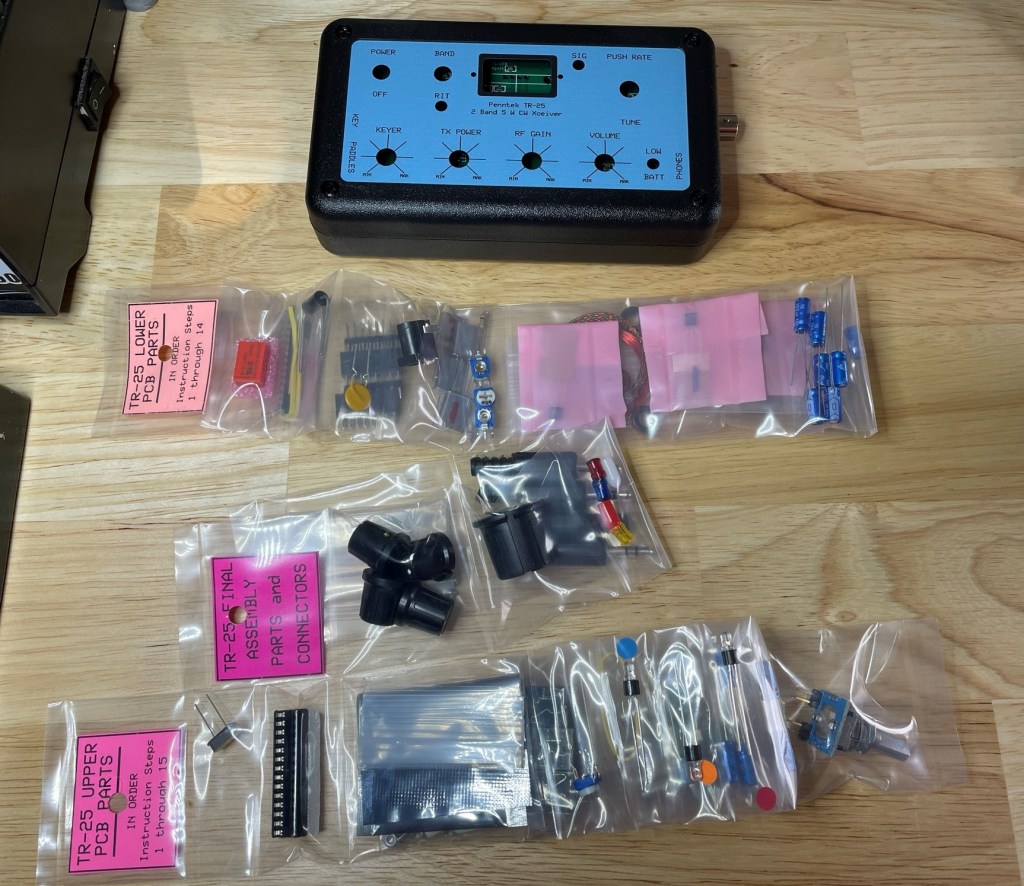
The PCBs are packed inside the radio case, and all the individual parts are packed together based on which part of the radio is being assembled.
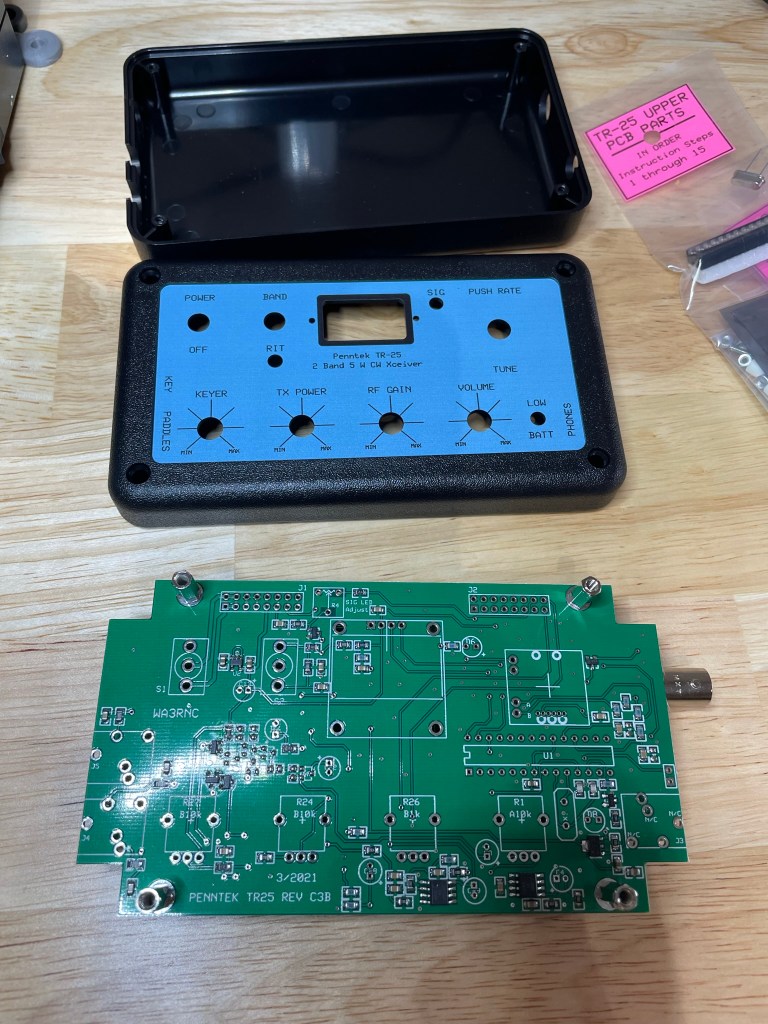
For example, all the lower PCB parts are packed together and separate from the upper PCB parts. Even more convenient is that within each set of parts, each one is organized in the order of assembly. A welcome usability improvement over other kits I’ve done where parts arrive loose in a single plastic bag.

Also included are print outs of the assembly manuals, which are likewise separate pages for each section

Installation of all components is very straight forward. If you can solder, you can install all the parts.

There are 6 toroids that need winding. None are overly difficult (I still have flashbacks of T1 on the QCX mini ;)). The directions are very easy to follow and there are picture to validate your windings against.

I’m not going to go through a step-by-step of the assembly – the manuals do that for you. K0SSK also has a great post showing assembly and testing of the kit.

Assembled minus the bottom half of the case – need access to the pots to perform final checks and adjustments. Nice clear OLED screen. Always makes me smile to see things work as expected, even more so that I didn’t let the magic smoke out. ๐Ÿ™‚

Quick Comparison

Looking at my other radios, the size lends itself to being compared with my Mountain Topper from LnR Precision.
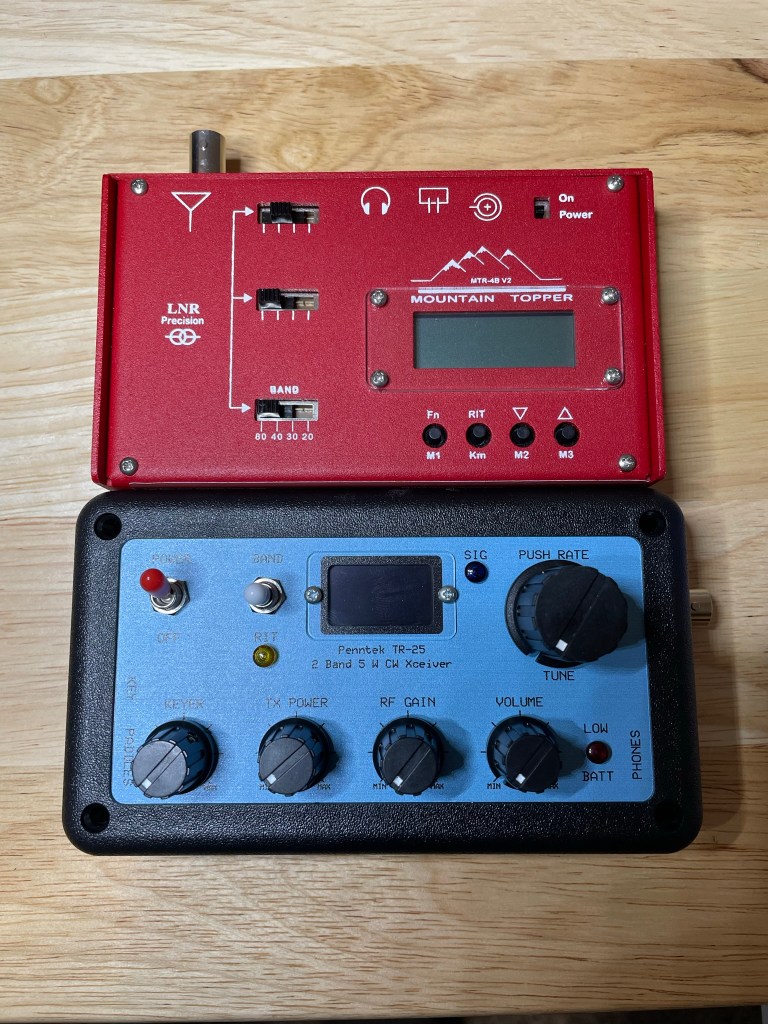
Both come in at roughly the same dimensions. The Mountain Topper is 4 bands (80/40/30/20) compared to the TR-25’s 2 bands (20/40). While both radios offer QRP portability for commonly used bands, you can see that the tradeoff is either usability (a control for everything) vs breadth of capabilities (more bands, memory slots, etc.).

It is a little of an apple and orange comparison when putting a commercially built radio up against a kit given that the MTR comes assembled, but it is the only multi-band radio that is close to the TR-25 in my collection.

Minor Nits

There are a few things missing from this radio that others have, such as:

  • No memory slots for recorded SOTA/POTA/CQ messages
  • No visual indication of WPM for the Iambic-B (there is no Iambic-A support) keyer, the dial simply has Min/Max markers
  • The design is intuitive and having a dial/knob/toggle for all settings is actually nice thing given how many radios use menu and sub-menus to death, but they do stick up from the radio and might be subject to being broken in the field – time will tell

These are minor nits in my opinion as not everybody needs every bell and whistle to enjoy SOTA/POTA/QRP operations.

Conclusion

This post is focused on the quality of the kit and what I received for my money. I have not yet gotten in on the air and will follow up with my impressions there. For now, keeping things focused on the kit building side.

The TR-25 is easy to assemble, with 4-9 watts of output depending on band and power input, no hideous menu structures to memorize (everything has a switch or knob on the face). A great little radio that can be put together and be on the air quickly and easily.

Pick yours up for $199 USD at their online store.

NOTE: Penntek is coming out with the TR-45L 4 band transceiver that is currently in beta testing. It looks a bit “old school” and I’m definitely intrigued.

Lab599 Discovery TX-500 Firmware Update 1.12.00

They did it again. Lab599 released a firmware update for their excellent HF portable the TX-500.

You can get the files on their download portal (hyperlink). Here is the full change log from that site:

Improved AGC algorithm
โ€ข  Added beacon mode activity indicator
โ€ข  Added reference frequency correction (TCXO adjustment)

Fall Camping with Radios

Yesterday I took my sons with me to camp at a local State Park that we hadn’t been to before.

Frontenac State Park (POTA K-2484) is approximately 1 hour south of my QTH in a sparsely populated area along the St. Croix river which forms the boundary between Minnesota and Wisconsin.

It is a beautiful park that is atop a forested rise that sits above farmlands and the river on the east.

We reserved the group camp site and invited a couple of friends and their kids to come along, and I – of course – brought my radio gear in the hopes of doing a second successful POTA activation.

Arriving in the afternoon, and with it being November in Minnesota, the sun sets quickly and earlier with each passing week. The weather was getting colder and the wind was quite gusty, making the cool fall temperature feel much colder than it was. We set about getting tents setup and getting some dinner, and waited for our friends to arrive. While we waited, I got things setup.

I took the opportunity to bring my Lab599 Discovery TX-500 radio which had only been used from home since my acquisition in August of this year. I also brought my LnR Precision Mountain Topper 4 v2 for the same reason, hoping to get both of them on the air outdoors.

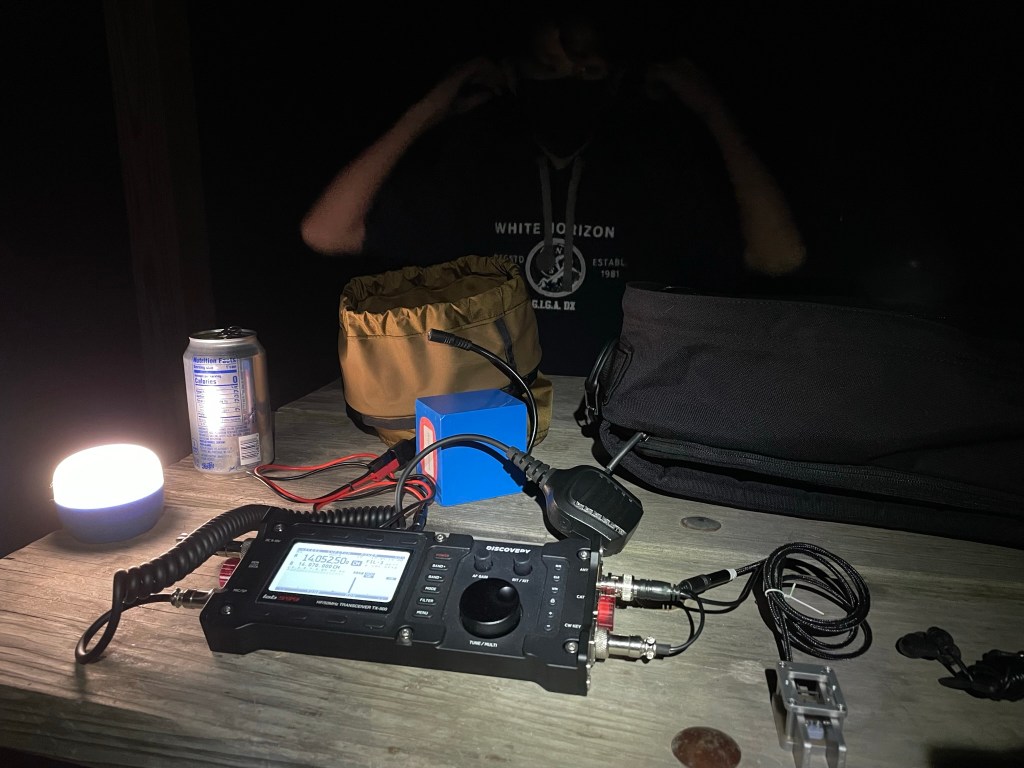
My 15 year old son making faces at me as I take a picture of my setup. Thanks son! You can see both the TX-500 in the center, and the N0SA paddle in the lower right.

I paired the two radios with a QRP Guys Tri-band Vertical which was supported by a 20ft (6m) Jackite telescopic pole.

New to me for this activation was a N0SA SOTA Paddle – an ultra-miniature paddle that is produced in very small lots by N0SA. This thing is tiny, but it is superbly constructed and a solid performer.

I called CQ once in order to get RBN to spot me and hoping to get the https://www.pota.app spots to pick up RBN and get me on the list (I scheduled a spot window before leaving). I was picked up in Arizona and California on 20m.

Immediately I had K7GT in Oregon come back and that kicked off a 20 minute back and forth. Allan was most patient with me as my fingers became increasingly numb and my fist became increasingly bad. Being a new CW operator meant that I also had to have him repeat things sometimes.

In the end, I had to call it quits as even with some thin gloves on I couldn’t reliably work the paddle any longer. The wind was gusting to 20+ mph (32kph or so) and with lower temps it was cutting straight through the wool.

I packed up the radios after a single contact and settled down by the fire with friends and my sons and enjoyed the warmth provided by both. We slept that night serenaded by the local coyotes while the raccoons scratched around the picnic table next to us looking for any crumbs left behind from dinner.

While I would have greatly enjoyed completing an activation of this park, I had to pack up early this morning to return home – something that I had known before I left the day before.

All in all this was another learning experience as all endeavors are; first of all I need to come up with a solid fall/winter POTA plan to deal with the cold and remain on the air, and secondly that even though it didn’t go as planned the experience was worth it nevertheless. I had logged a great contact with K7GT and had a good time with my boys.

Time with my sons is never wasted. ๐Ÿ™‚

Some more pictures from a great getaway.

Bedtime
A very large group campsite that included two pavilions and nobody else for a quarter of a mile
Sunrise peeking out through the trees

Integrated Battery Pack for the Lab599 Discovery TX-500

A new item arrived on my doorstep this week.

Brewer 3D Design (hyperlink), a seller on Etsy.com, has created a few accessories for this rugged and capable radio including screen covers and caps for the connectors. They recently added a battery pack for the radio that makes using it in the field that much more convenient.

From their posting:

While the world waits patiently for the OEM battery pack from Lab599, I decided to build my own based on their initial renderings.

Brewer 3D Designs

So what did I get in the mail today?

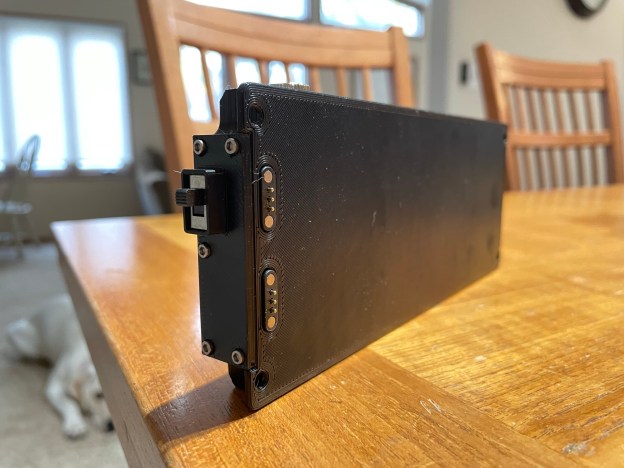
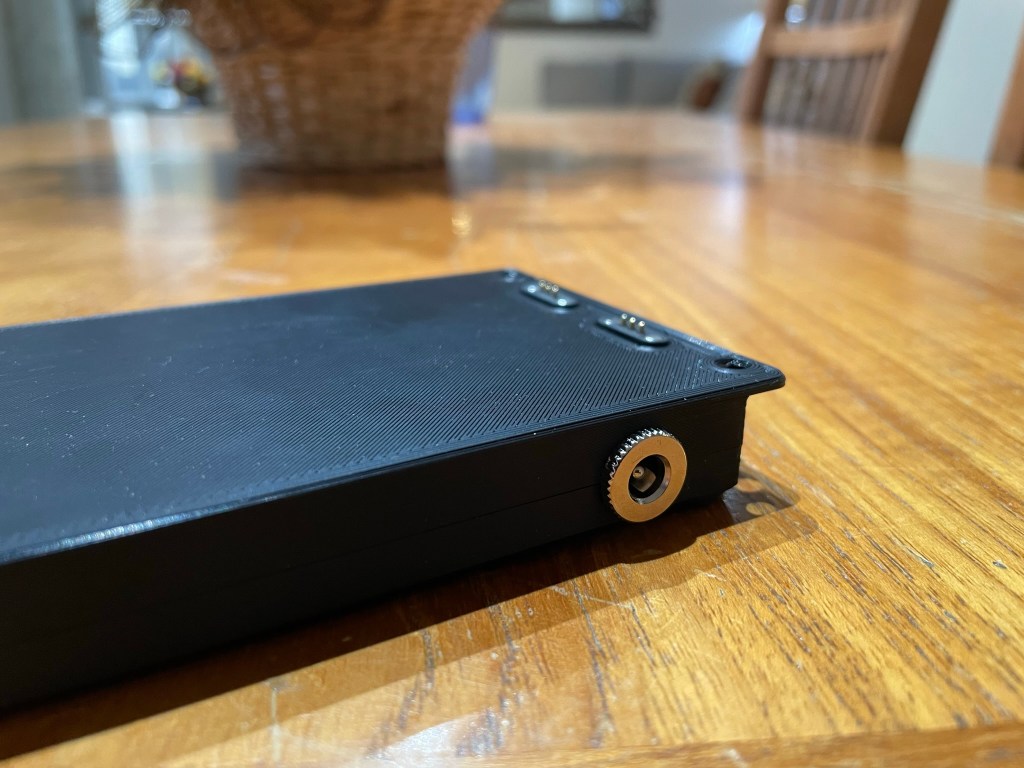
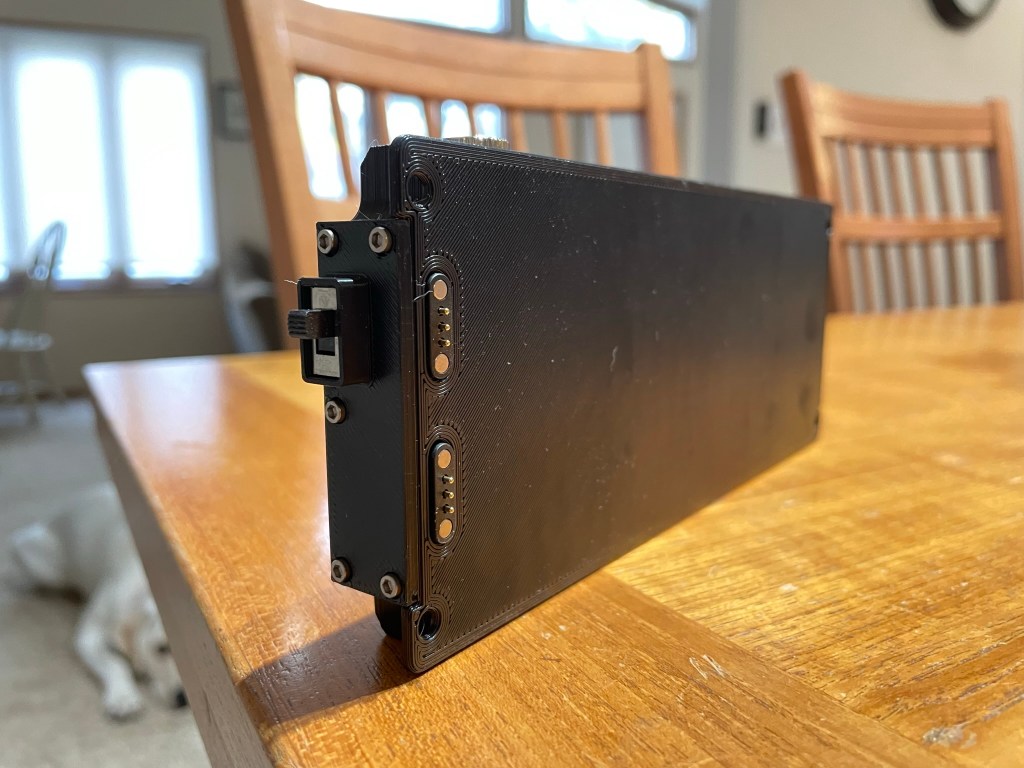
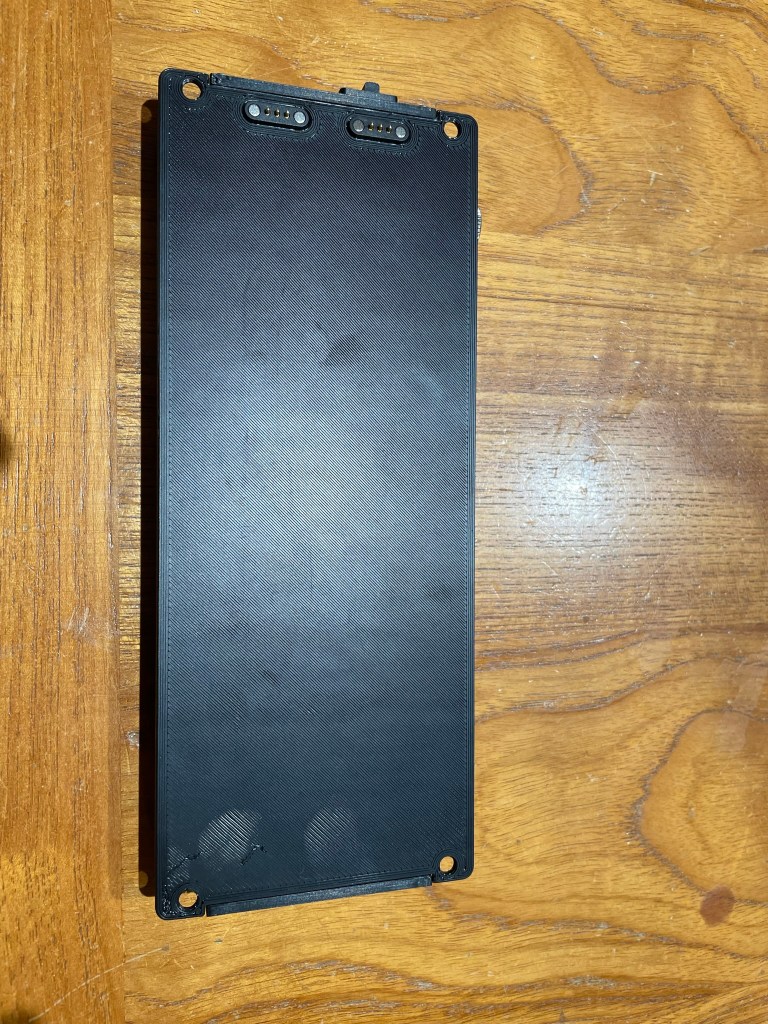
I received a well designed, 3D printed (in ABS) battery pack that mounts via the included hardware directly to the back of the radio.

Also in the box is a 3D printed radio stand that tilts the radio back into a comfortable operating position, and a hang tag that lists a serial number (mine is 0006 which I assume means that this is the 6th one sold) and thank you note from the seller, and two (spare I assume) magnetic connectors that align to the connections on the back of the radio.

The specs as noted by the seller are:

  • 4000 mAh capacity
  • 9-12.6 volts
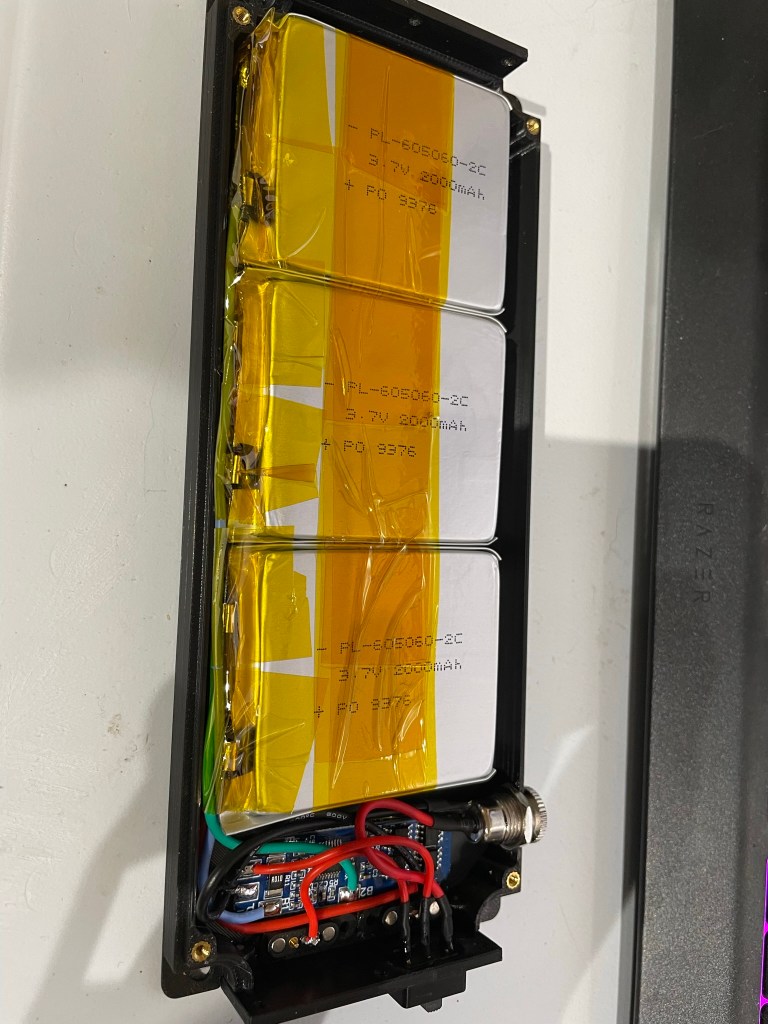
  • Li-Ion polymer cells (PL-605060-2C)
  • 3S2P configuration
  • Included BMS
  • 5.5mmx2.1mm charging jack

Mounting the battery pack requires the removal of the 4 rubberized feet on the back of the radio which exposes 4 tapped holes which are there for future accessories. Installation is simple – use the 4 included screws to attach the battery pack to the radio via the now exposed holes. Make sure that you align the connections properly. They are magnetic so you will feel a slight attraction as they line up.

Note that no instructions are provided with the radio, but mounting and operation is quite straightforward. For the switch, one direction enables power to the radio while the other allows for charging. HINT: sliding the switch towards the center of the pack powers the radio. Towards the outside is for charging.

Also note that installing the battery pack makes the built-in tilt legs non-operable – they are blocked by the battery pack. That is what the included stand is for.

Details

Measuring the pack with my cheap calipers, I get the following measurements:

  • 17.1mm thick (top to bottom), compared to 21mm for the radio itself
  • 79.5mm wide, compared to 90.5mm for the radio
  • 197mm long, compared to 205mm for the radio (not including the connections in the measurement)

Attaching the pack almost doubles the thickness of the radio itself, but doesn’t add any additional width or length.

The print resolution seems to be quite fine, with all layers uniform and no visible separation or flaws that would affect durability or longevity. The lines and edges are smooth. All parts mate up uniformly and without gaps.

The case is held together with screws that are connected to threaded inserts in the ABS – no direct screw to plastic contact. Nicely done!

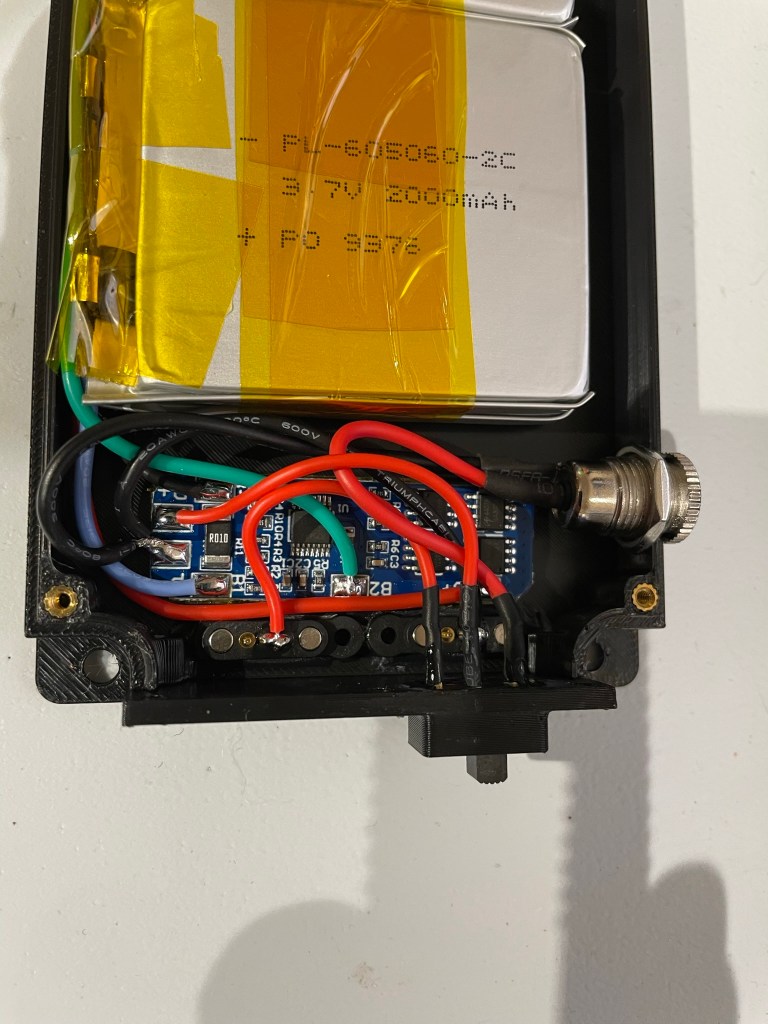
On the inside, this is what you’ll find:

The BMS appears to be this one on Amazon (hyperlink), or at least something similar.

Specs from that listing are:

  • 3 strings: 3 18650 batteries or polymer lithium batteries in series
  • Polymer battery rated voltage: 10.8V
  • Rated voltage of 18650 or 3.7V lithium battery: 11.1V
  • Maximum discharge current limit: 10A
  • Maximum working current: 5-8A

Upon full charge the battery bank should have about 12.6 volts.

Final Thoughts

KB7MBD at Brewer 3D Design has created an extremely well thought-out design and has implemented it quite well. The design is a good balance between utility and matching of the TX-500’s aesthetics. I haven’t had enough time yet to determine how the battery holds up, however I am convinced that the capacity (about what I normally carry outside) combined with the convenience will mean that this is a power pack that I can use for multiple POTA activations. Further testing will be required which I guess means more time playing radio.

Bummer ๐Ÿ˜‰

I also need more time to determine if the BMS is RF quiet or not – I don’t foresee any issues there but is always a concern with anything electrical that is attached to our radios.

At the end of the day, it is exactly what it is advertised to be; namely a rechargeable battery pack that fits the TX-500 like an OEM accessory.

The pack can be purchased via their Etsy site, though availability determines whether it shows up in their listings or not. Also for anyone outside of the US, at the time of this writing the seller offers a “kit” version that doesn’t include the battery cells themselves.

Expect a follow up after some field time!

Additional Images

Ignore my thumbprints at the bottom – embarrassing.

UPDATE – 2022/03/11

After posting this I started to receive multiple inquiries about the availability of this product in the vendor’s store. I should point out that I have no affiliation with the vendor, and therefore have no visibility into whether it is available or not at any given time.

My working assumption is that like many vendors on Etsy, items only appear as they are available and ready for purchase.

You can see the vendor’s shop at https://www.etsy.com/shop/brewer3Ddesign

There is contact information there which you can use to reach out and verify availability.

Shameless Plug

If you like what you read on my site, consider buying me a coffee (well, I don’t actually drink coffee, but a soda would be nice) at https://www.buymeacoffee.com/kd0hbu. I don’t use advertising and anything reviewed is done with items purchased myself.

Thanks!

Building a 3D printed portable vertical antenna

I have a problem.

It is probably a common one amongst hams but it takes significant amount of time, effort, and resources in my spare time.

……

I like to create/build/home brew things. Like…all the time.

Its a sickness (or so my wife thinks).

Anyway.

I have had a QRP Guys Portable Tri-band Vertical kit for a while, and it is a great kit that is easy to assemble and works great. It is small, lightweight, and provides 20/30/40 meter coverage. Run the radiating element up a collapsible pole and you’ve got a field antenna that sets up quickly.

Since I was raised an “Army Brat” and it was drilled into me from an early age that “two is one, one is none”, I never stop at having just one POTA/SOTA vertical antenna system.

My Super Antenna, CHA MPAS Lite, Buddistick, Wolf River Coils Silver Bullet, and others can attest to that.

I might have another problem – antenna addition!

After having spent some time researching options, I decided on the following factors being important to me:

  • No kit – I’ve done multiple kits and while I enjoy them and will still do more in the future, I wanted to build something more “DIY” than that
  • Lightweight
  • Multi-band (Ideally 20/30/40/60/80)
  • Most parts (if not all) are already in my possession amongst my surplus of wires, connectors, and such
  • Inexpensive in case I do have to buy anything (i.e. less than $10 USD) out of pocket (not including what I have already purchased for past projects)
  • Occupy some degree of free time ๐Ÿ˜‰

I then settled on wanting a tapped coil design that would allow me to play with the tuning to find the sweet spots per band, and after looking at various home brewed ideas, I found SA2CLC‘s Vertical Antenna Loading Coil on Thingiverse.

Printing the Parts

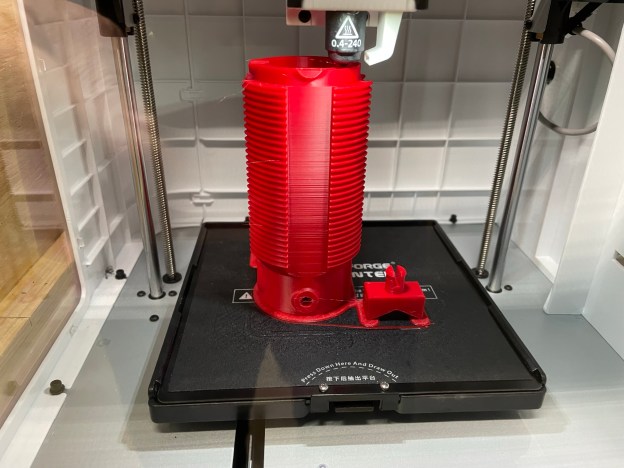
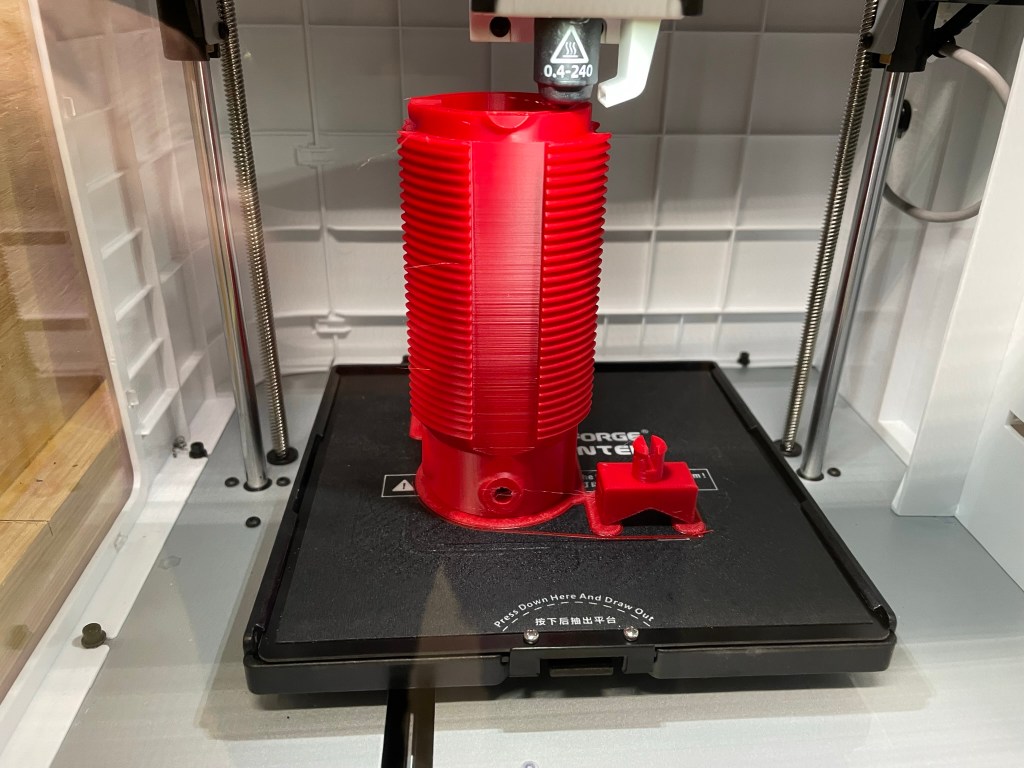
It checked all of the boxes above and, after downloading the STL files, I begun printing the coil form and mounts. I have a couple of printers, but find that my Flashforge Adventurer 3 provides the most consistent ABS prints for me. I’m not a fan of the constrained print area of this printer, but it does do a good job at whatever I throw at it.

The photo above is about 90% complete. I have to give SA2CLC a lot of credit for an elegant design. No supports are needed to print this model, and it is well laid out and logical. Great work!

I chose to use ABS and printed the parts at 50% infill at standard quality. My goal here was to have a balance between weight and strength, with ABS widely used in products where durability matters.

About 15 hours later I had three parts; the coil form itself, and two mounts which allow you to affix the coil to a telescopic pole.

Upon completion of the print, I immediately realized a mistake on my part – I chose ABS for all of the parts, and the two mounts require some flex in the prongs so that they can be inserted into the body of the coil.

ABS doesn’t like to flex like some other plastics do, and I quickly snapped one prong off of the first piece I tried to insert into the coil, so I kicked off another print of just the mounts using PETG. That is what SA2CLC used and posted to his model page on Thingiverse.

That is another problem I have – reading the directions!

I then sent off a print to my Creality Ender 3 (I don’t have the higher temp nozzle to allow for PETG prints on the Flashforge – yet) and within a couple of hours had two new mounts that won’t break on me.

Assembling the Coil

In addition to the ABS/PETG printed parts, I used the following materials:

  • 1.25″ non-insulated alligator clips
  • SO239 chassis mount connectors
  • 18 gauge aluminum wire
  • 6-32 machine screws and nuts
  • 4mm binding post connectors
  • short length of 18 gauge wire to connect the center plug of the SO239 to the coil
  • ring terminals
  • aluminum tape (see below)

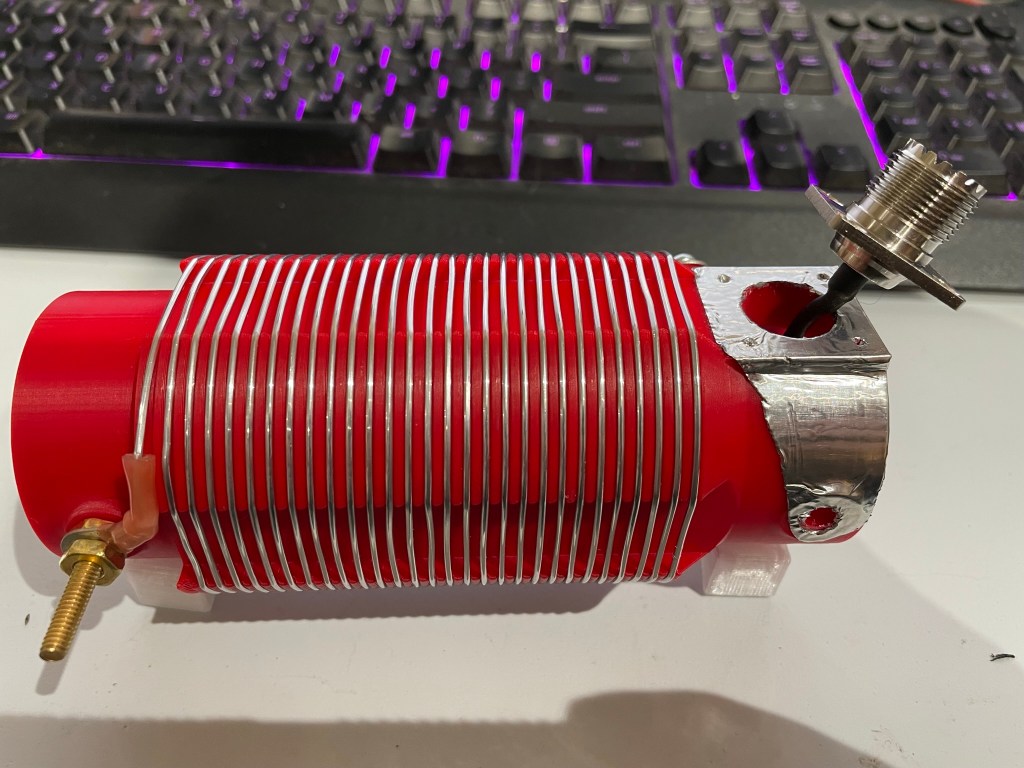
I followed the excellent YouTube video that the creator posted as a part of his model. The two places that I deviated slightly was first in connecting the ground for the SO239 to the binding post connectors. Why? I had seen this used in other projects online and had been wanting to apply it to a project of mine for a while, so I went ahead and added it here. Time will tell if this is effective or not, or even if it will stay put or not.

UPDATE: I found some thin sheet metal from some ducting work I had done previously that I decided would be more durable than the aluminum tape shown in the next photo. I cut out a piece that is roughly the same dimensions as what is shown below. As before, we’ll see how effective this is over time.

You can see the white PETG mounts on the bottom of the coil – one left and one right.

The second deviation was the use of another 6-32 machine screw and wingnut for the radiating element connection instead of a binding post as in the creator’s design. As with the aluminum tape, I may change that out but I’ve used wingnuts on multiple antennas and find them to be solid connections that are still quick to add/remove wires to. That is especially true when the wires use spade connections.

We’ll see how it goes in the field.

Stay tuned for Part 2 – Assembly and Initial Testing